

Publirreportaje
The invisible code behind every website you visit

July 10, 2026

The Invisible Code Behind Every Website You Visit

A webpage looks simple from the outside. Text, a few images, some buttons, a menu that opens when you click it. Underneath, though, a webpage is doing a great deal of work you never see. Much of that work is handled by website scripts, and they explain a lot about why one page feels quick and tidy while another feels slow and crowded.

Improve Your Browsing

This article looks at what scripts actually are, why the number running on a page varies so widely, and what you can adjust if you want a cleaner experience. Toward the end, it covers where an ad-blocking extension fits, since scripts and on-page clutter are closely linked.

What Website Scripts Do

A website script is a small program that runs inside your browser as a page loads. Its job is to make the page respond to you rather than sit there as fixed text.

Most of the features people take for granted depend on scripts. A search box that suggests results as you type, an image gallery you can swipe through, a shopping cart that updates its total, an interactive map you can drag, a comment section that posts without reloading the page: each of these is powered by script running in the background. Strip the scripts away, and most modern sites would fall back to static pages with very little you could interact with.

In short, scripts are one of the technologies that make the web feel responsive. They are not an add-on; they are much of what a page is once it loads.
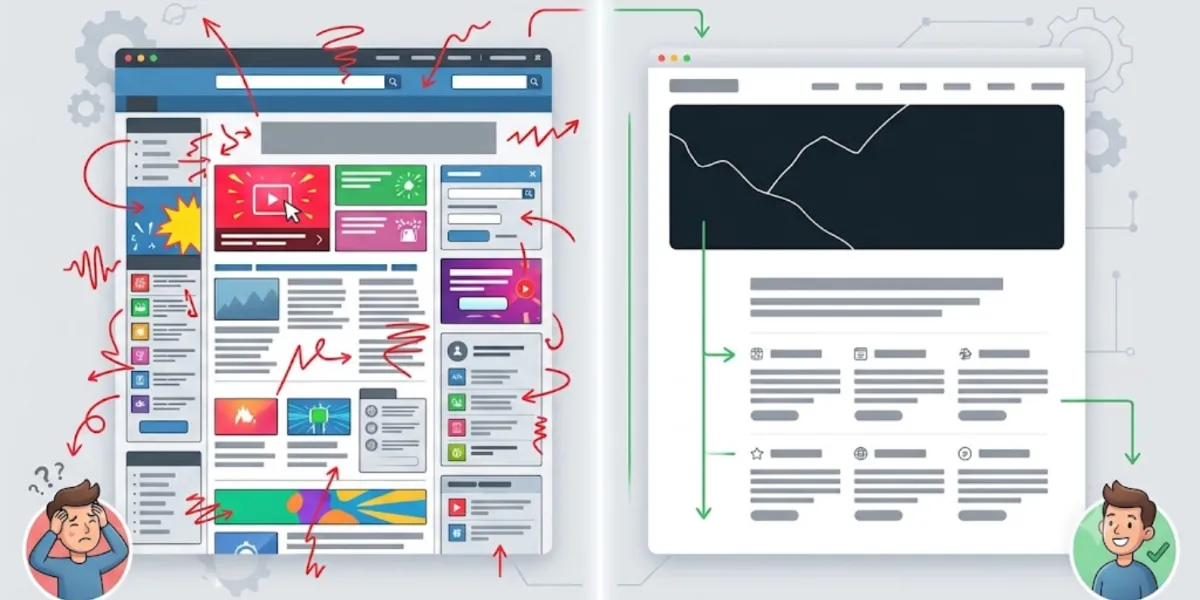

Why Some Pages Feel Busier Than Others

Not every script exists for the same reason, and that distinction matters. Broadly, they fall into two groups.

The first group is essential to the page. These scripts display content, process the form you are filling in, or let you complete a purchase. Without them, the page cannot do what you came for.

The second group supports functions layered on top: website analytics that measure traffic, social media integrations, advertising platforms, and recommendation systems that suggest related content. Each addition is small on its own. The trouble is that they accumulate. As a site adds features over the years, the number of scripts running on a single page can climb steadily, and the page ends up with more moving elements, more promotional content, and more competing for your attention than you might expect. That accumulation is usually what people are noticing when a page feels heavy.

Cleaner browsing experience

Simple Browser Maintenance Habits

You do not need to understand a line of code to browse more comfortably. A short, occasional routine handles most of what matters.

Keeping your browser updated is the most useful habit. Each release tends to improve how the browser handles modern sites and their scripts, along with performance and privacy refinements, so staying current is a low-effort baseline. Beyond updates, it helps to review your browser permissions from time to time, since sites accumulate access to notifications, location, and other features you may no longer want. A quick look at your installed extensions is worth doing too, dropping any you have stopped using, and clearing out browsing data you no longer need keeps things organized. None of this takes long, and together it keeps your browser running efficiently while supporting better digital privacy.

How Ad-Blocking Extensions Reduce Distractions

The habits above address how your browser is set up. They do less about the advertising elements that load on the page itself, many of which arrive through the second group of scripts described earlier. Banners, pop-ups, autoplay media, and web trackers frequently appear alongside the content you opened.

An ad blocker works on this layer. Its main function is to reduce intrusive ads, and many also limit a portion of the web trackers tied to advertising networks. Because certain elements never load, the browser has fewer scripts to process, pages tend to appear cleaner, and less of your activity is passed to those networks.

It helps to be precise about what such a tool is. An ad blocker is not antivirus software, and it is not a complete browser security solution. It manages advertising clutter and tracking, while your settings and habits cover the rest.

Why Many Users Choose the Total Adblock Browser Extension

For anyone looking to create a cleaner browsing environment, the Total Adblock Browser Extension is one option worth considering. It is designed to block intrusive ads, reduce many web trackers, and simplify supported pages by cutting unnecessary visual clutter.

In everyday use, the benefit usually shows up as readability. With fewer elements competing for attention, reading articles, shopping online, or researching a topic tends to feel more comfortable. That practical difference is much of the reason people install it.

The limits are worth stating plainly. The Total Adblock Browser Extension is not antivirus software and does not provide complete cybersecurity protection. Its purpose is narrower: supporting online privacy and improving browsing comfort through ad and tracker management. Used alongside your browser's built-in privacy features and responsible habits, it fits into an everyday routine rather than replacing any part of it.

What Readers Are Saying

Highly rated by readers who wanted fewer scripts and a calmer, cleaner browser.

"Pages that used to crawl now load without all the ad scripts fighting for my attention."

Pedro G.

"My laptop stays cooler while I browse. Fewer ads really does mean less work for the browser."

Clara V.

"Simple to install and it does exactly what it says. News sites finally feel readable again."

Manuel S.

"I didn't realise how many trackers were running until they were gone. Nice and quiet now."

Aisha K.

"Reading long articles is so much calmer without pop-ups and autoplay video everywhere."

Tomas L.

A Cleaner Browser, Feature by Feature

Fewer Scripts to Process

Ad and tracker scripts are blocked before they run, so your browser has far less to load and execute on every page you open.

Cleaner, Calmer Pages

Banners, pop-ups, and autoplay clutter are stripped away, so the content you actually came for stays front and centre.

Less Tracking in the Background

Many of the advertising trackers that quietly follow your activity from site to site are limited, so less of what you do is handed off.

Lighter on Your Device

With heavy ad elements skipped entirely, supported pages tend to feel quicker to load and use less memory as you browse.

Simple, Per-Site Control

Turn blocking on or off for any site with a single click whenever a page genuinely needs its scripts to run in full.

Total Adblock: Free vs Premium

Feature Free Premium
Basic ad blocking (lesser-known sites)✓✓
Ad blocking on major sites (YouTube, Facebook, etc.)✗✓
Video-ad blocking✗✓
Blocks unwanted browser notifications & pop-ups✗✓
Tracker / privacy protection✗✓
Bundled TotalAV antivirus subscription✗✓
Priority support✗✓
Typical price (US, promotional) $0 ~$19 first year, then renews ~$99/year · 7-day free trial

Prices shown are indicative introductory figures for the United States and may vary by region and promotion; the renewal price applies after the first year. Always confirm the current price and terms on the official Total Adblock website before purchasing. This page may earn a commission from purchases made through its links.

Getting Started in Five Steps

01

Open the Chrome Web Store

Click "Get the App" to open the official Total Adblock listing in the Chrome Web Store.

02

Add It to Your Browser

Select "Add to Chrome" and confirm the permissions to install the extension in seconds.

03

Pin It to Your Toolbar

Pin Total Adblock so its controls are always a single click away when you need them.

04

Set Your Preferences

Choose which sites to block and allow anything you would rather keep running as normal.

05

Browse Cleaner

Reload a page and watch intrusive ads, pop-ups, and background clutter fall away.

Voices From Everyday Browsers

"A cleaner browser saves me time and cuts the digital clutter across my whole workday."
Julia R., Seville
"Once the extra scripts stopped loading, everything just felt lighter and faster to use."
Mark D., Manchester
"I finally understand why some pages felt so heavy. Blocking the ad scripts fixed most of it."
Sofia N., Lisbon
"Reviewing my extensions and adding a blocker made my browser feel brand new again."
Daniel K., Krakow
"Fewer trackers following me around from page to page is worth it on its own."
Elena V., Milan

Questions About Scripts & Blocking

What is a website script?

A website script is a small program that runs in your browser as a page loads. Scripts power things like search suggestions, image galleries, and shopping carts that update as you use them.

Why do some pages feel so busy?

Scripts accumulate over time — analytics, social widgets, ad platforms, and recommendation systems. Each one is small on its own, but together they give your browser far more to run.

What does an ad blocker actually do?

It stops many advertising and tracker scripts from loading. Because those elements never appear, pages look cleaner and your browser has less to process.

Is Total Adblock an antivirus tool?

No. It manages advertising clutter and tracking. It is not an antivirus product and it is not a complete browser security solution — it handles the advertising layer only.

Will blocking scripts break websites?

Essential scripts that display content or process forms are left to work as normal. If a page ever needs everything to run, you can allow that site with a single click.

Can it help my browser run faster?

Because certain heavy ad elements never load, supported pages often feel quicker to open and use less memory while you browse.

How else can I keep my browser tidy?

Keep your browser updated, review site permissions now and then, remove extensions you no longer use, and clear out browsing data you no longer need.

Enjoy a Simpler Way to Browse

A cleaner web experience comes from two things working together: thoughtful browsing habits and tools that manage what loads on the page. Keep your browser updated, review your permissions and extensions now and then, and let a good ad blocker handle the advertising clutter. If you would like to reduce intrusive ads, limit many web trackers, and enjoy webpages with fewer distractions, the Total Adblock Browser Extension may be worth exploring.

Improve Your Browsing

This page is a paid advertorial brought to you by qyvorex.com. It is intended for promotional purposes only and should not be considered independent journalism, editorial content, or consumer advice. The content has been created or curated by the advertiser and may include affiliate links. We may receive compensation if you choose to purchase a featured product or service via the links provided. Please refer to our Advertising Disclaimer and Privacy Policy for more information.